Agent Reinforcement Learning
After you can run parallel agent interaction, the next step is to train the policy with the same rollout stack. Uni-Agent connects the agent loop to verl, so each training sample can launch a sandbox, run multi-turn tool interaction, compute a task reward, and feed the result back into RL training.
For agent tasks, we recommend fully asynchronous training. Agent rollouts have uneven latency because different tasks take different numbers of turns, commands, tests, and sandbox operations. Fully async training keeps rollout workers and training workers running independently, which usually gives better utilization than waiting for every rollout in a synchronous batch.
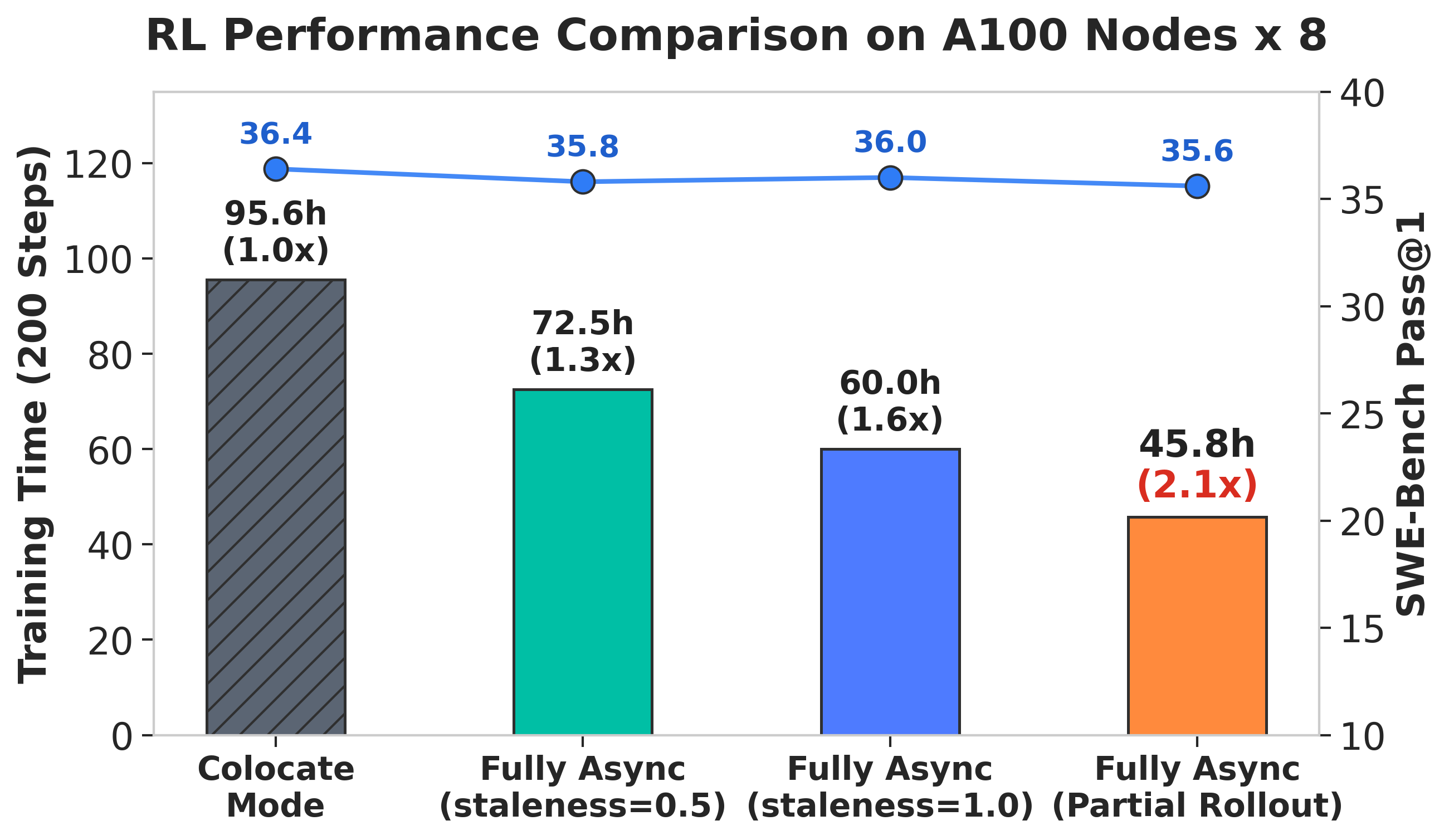
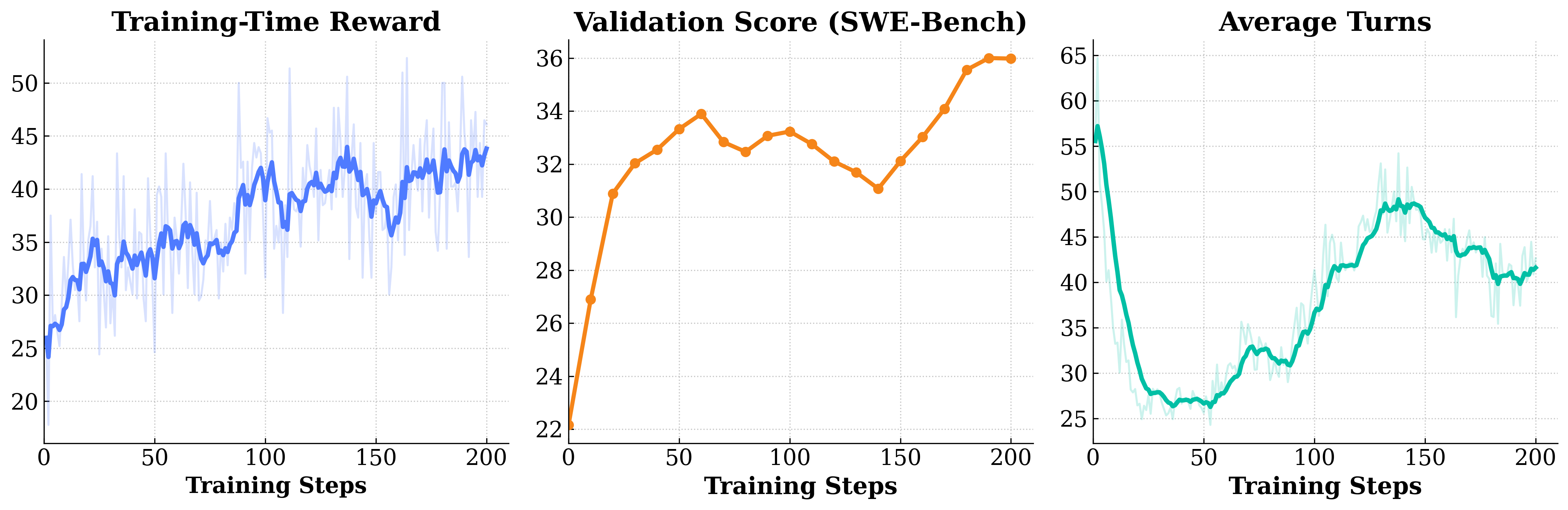
The figure below shows an example Qwen3-30B-A3B-Instruct training run on veFaaS (100 Turns, 128K), using R2E-Gym-Subset for training and SWE-Bench Verified for evaluation.
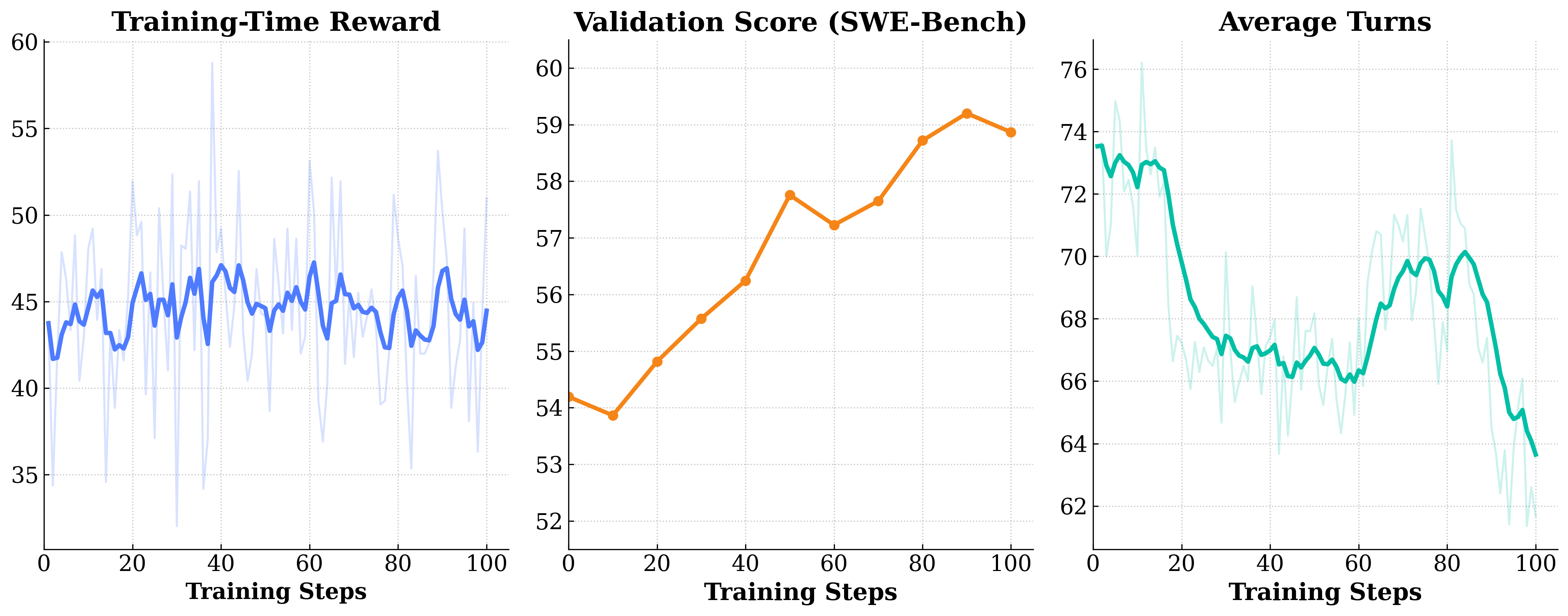
The figure below shows an example Qwen3.5-9B training run on veFaaS (100 Turns, 128K), using SWE-reBench for training and SWE-Bench Verified for evaluation.
The launch scripts live under examples/agent_train.
Recommended Scripts
Use the fully async scripts for normal agent RL runs:
examples/agent_train/train_qwen3p5_dense.sh: fully async recipe for a dense Qwen3.5 model. This is the best starting point for most runs.examples/agent_train/train_qwen3p5_moe.sh: fully async recipe for Qwen3.5 MoE with Megatron parallelism and MTP-related settings.examples/agent_train/train_qwen3_moe.sh: older Qwen3 MoE fully async recipe, kept mainly as a reference.examples/agent_train/single_node_debug.sh: small single-node debug launcher for checking data, runtime env, agent config, and rollout behavior.
examples/agent_train/train_sync.sh is still available for reference, but it is not the recommended path for long-horizon agent training. Sync training is simpler conceptually, but agent rollout latency is too variable for it to be the default choice.
Prepare Inputs
Launch training from the repository root so Ray can package both verl/ and uni_agent/.
Set a shared data root first:
export RAY_DATA_HOME=${RAY_DATA_HOME:-${HOME}/verl}
mkdir -p "${RAY_DATA_HOME}/data/swe_agent"
Dataset
The training scripts expect Parquet datasets with prompt, agent_name, and extra_info.tools_kwargs. The tools_kwargs field carries per-sample sandbox and reward metadata, such as the task image, repository reset command, and reward metadata.
For a Modal-based SWE training setup:
# Training Data
DEPLOYMENT=modal python examples/data_preprocess/swe_rebench.py --local-save-dir "${RAY_DATA_HOME}/data/swe_agent"
# Evaluation Data
DEPLOYMENT=modal python examples/data_preprocess/swe_bench_verified.py --local-save-dir "${RAY_DATA_HOME}/data/swe_agent"
This writes:
${RAY_DATA_HOME}/data/swe_agent/swe_rebench_filtered_modal.parquet${RAY_DATA_HOME}/data/swe_agent/swe_bench_verified_modal.parquet
If you use a different backend, set DEPLOYMENT accordingly and point TRAIN_FILE / TEST_FILE to the generated files.
Runtime Env
Ray uses a runtime env file to package the working directory and inject credentials into the job. Start from the example:
cp examples/agent_interaction/runtime_env.yaml \
   "${RAY_DATA_HOME}/data/swe_agent/runtime_env.yaml"
Edit that file before launching training. For Modal, set MODAL_TOKEN_ID and MODAL_TOKEN_SECRET. For veFaaS, set VEFAAS_FUNCTION_ID, VEFAAS_FUNCTION_ROUTE, VOLCE_ACCESS_KEY, and VOLCE_SECRET_KEY.
Training Agent Config
The training script controls the training system. The agent config controls what happens inside each rollout: sandbox backend, tools, interaction limits, and reward settings.
For Modal:
cp examples/agent_interaction/agent_config_modal.yaml "${RAY_DATA_HOME}/data/swe_agent/agent_config.yaml"
For veFaaS, copy examples/agent_interaction/agent_config_vefaas.yaml instead.
At runtime, the trainer passes this path through:
actor_rollout_ref.rollout.agent.agent_loop_config_path=${AGENT_CONFIG_PATH}
The dataset still provides per-sample fields such as tools_kwargs.env.image, tools_kwargs.env.post_setup_cmd, and tools_kwargs.reward.metadata.
Launch Fully Async Training
Set the common paths explicitly:
export MODEL_PATH="${RAY_DATA_HOME}/models/Qwen3.5-9B"
export TRAIN_FILE="${RAY_DATA_HOME}/data/swe_agent/swe_rebench_filtered_modal.parquet"
export TEST_FILE="${RAY_DATA_HOME}/data/swe_agent/swe_bench_verified_modal.parquet"
export RUNTIME_ENV="${RAY_DATA_HOME}/data/swe_agent/runtime_env.yaml"
export AGENT_CONFIG_PATH="${RAY_DATA_HOME}/data/swe_agent/agent_config.yaml"
Then launch the dense fully async recipe:
NNODES_TRAIN=1 \
NNODES_ROLLOUT=1 \
NGPUS_PER_NODE=8 \
bash examples/agent_train/train_qwen3p5_dense.sh
For the MoE recipe:
export MODEL_PATH="${RAY_DATA_HOME}/models/Qwen3.5-35B-A3B"

NNODES_TRAIN=1 \
NNODES_ROLLOUT=1 \
NGPUS_PER_NODE=8 \
bash examples/agent_train/train_qwen3p5_moe.sh
Scale NNODES_TRAIN and NNODES_ROLLOUT separately. Training nodes run policy updates; rollout nodes run inference and agent environments. For agent workloads, rollout capacity is often the first bottleneck because sandboxes and task execution can dominate latency.
Key Knobs
Start with the script defaults, then tune these first:
NNODES_ROLLOUT,NNODES_TRAIN,NGPUS_PER_NODE: cluster size split between rollout and training.TRAIN_FILE,TEST_FILE: train and validation Parquet files.MODEL_PATH: base policy checkpoint.RUNTIME_ENV: Ray runtime env with Python path, dependency, and credential settings.AGENT_CONFIG_PATH: agent loop YAML.n_resp_per_prompt: number of rollouts per prompt.actor_rollout_ref.rollout.agent.num_workers: number of agent rollout workers per rollout process.max_prompt_length,max_response_length: context budget for the agent trajectory.staleness_threshold,trigger_parameter_sync_step,require_batches,partial_rollout: fully async scheduling and weight synchronization behavior.
For MoE or large models, also check tensor, pipeline, context, and expert parallelism settings such as GEN_TP, TP, PP, CP, and EP in train_qwen3p5_moe.sh.
Single-Node Debug
Before launching a large run, use the debug script to validate the full path from data loading to rollout execution:
export TRAIN_FILE="${RAY_DATA_HOME}/data/swe_agent/swe_rebench_filtered_modal.parquet"
export TEST_FILE="${RAY_DATA_HOME}/data/swe_agent/swe_bench_verified_modal.parquet"
export RUNTIME_ENV="${RAY_DATA_HOME}/data/swe_agent/runtime_env.yaml"
export AGENT_CONFIG_PATH="${RAY_DATA_HOME}/data/swe_agent/agent_config.yaml"

bash examples/agent_train/single_node_debug.sh
Use this to catch missing credentials, wrong sandbox images, broken post_setup_cmd, or reward errors before scaling out.
Sync Training
train_sync.sh exists for comparison and simple experiments. For production agent RL, prefer the fully async scripts above. Sync training waits for the rollout batch to complete before updating the policy, which is usually inefficient for long-horizon agent tasks with highly variable episode lengths.